Add applicable legislations
In this guide
Overview
Legislations are legal frameworks or regulations that govern the collection, storage, and sharing of data. By adding legislations to the system, you enable Editors to associate datasets with relevant legal requirements—ensuring compliance and providing clear legal context for Data Users.
For example: The INSPIRE directive requires the creation and publication of a wide range of public sector datasets across a number of domains. By adding this legislation to the system, Editors can associate it with datasets to provide essential context information to Data Users.
How legislations work:
- Catalogue Managers (or equivalent roles) add legislation entries from official legal databases to the system. The platform integrates with Legilux↗ for Luxembourg legislation and EUR-Lex↗ for European Union legislation
- Editors associate legislations with dataset records when adding or editing datasets
- Legislation details appear in published dataset metadata
Add a legislation
Add legislations to the system to enable Editors to associate them with dataset records. You must be a Catalogue Manager or have the permission to manage controlled vocabularies. Check your permissions.
To add a legislation that can be applied to datasets:
-
Select the entities icon () beside your profile icon.
-
Select Applicable Legislations. The list of existing legislation entries appears.

-
Select Expand Form, then select the legislation body (Legilux or EUR-Lex).
-
Fill out the legislation form:
- Search: Search for the legislation in the database by label, description, or link
- Label: The name of the legislation
- Description: The description of the legislation
- Link: Direct link to the legislation in the official database
- Organisation: Select the organisations that can use this legislation, or leave blank to make it globally available
-
Select Create Applicable Legislation. The new legislation entry appears in the list.
The legislation now appears in your vocabulary list:
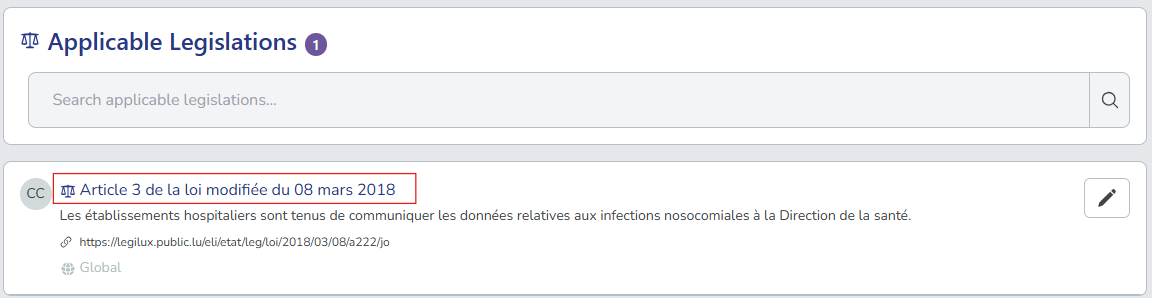
Editors can now select this legislation when creating or editing dataset records:

Manage existing legislations
After you create legislation entries, you can edit or delete them as needed.
-
In the legislation list, search and locate the legislation you want to manage. Use the filters to help find specific entries.
-
Select the edit icon () next to the legislation entry.
-
Choose your action:
- Edit: Update the legislation details.
- Delete: Permanently remove the legislation from the system. You can only delete legislations that are not associated with any datasets.
After you add legislations, Editors can associate them with dataset records when they add or edit datasets. This supports regulatory compliance and provides legal context across your data catalogue.