Add keywords
In this guide
Overview
Keywords are controlled terms or phrases that describe the content or subject matter of datasets. By adding keywords to the system, you provide consistent terminology that Editors can use to tag datasets when they create or edit them. This tagging helps Data Users discover relevant datasets through keyword search and filtering.
How keywords work:
- Catalogue Managers (or equivalent roles) create keywords that Editors can use to tag datasets
- Keywords can be made globally available or restricted to specific organisations, if your setup applies
- Editors tag datasets with existing keywords when they add or edit datasets
- Editors can also create new keywords through the dataset bulk upload feature
This guide is for Catalogue Managers (or equivalent roles) who want to manage or add new keywords to the system. If you're an Editor who wants to tag datasets with existing keywords, see Add or edit a dataset.
Add a keyword
Add keywords to the system so Editors can use them to tag datasets. You must be a Catalogue Manager or have the permission to manage controlled vocabularies. Check your permissions.
To add keywords that can be assocated with dataset records:
-
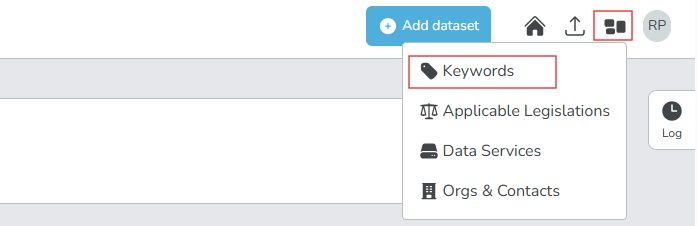
Select the entities icon () beside your profile icon.
-
Select Keywords. The list of existing keywords appears.
-
Select Expand Form and fill out the keyword form:
- Label: The name of the keyword
- Organisation: Select the organisations that can use this keyword, or leave blank to make it globally available
-
Select Create Keyword. After the keyword is create, it appear on both the Key word list and in the dataset record editor for tagging datasets.
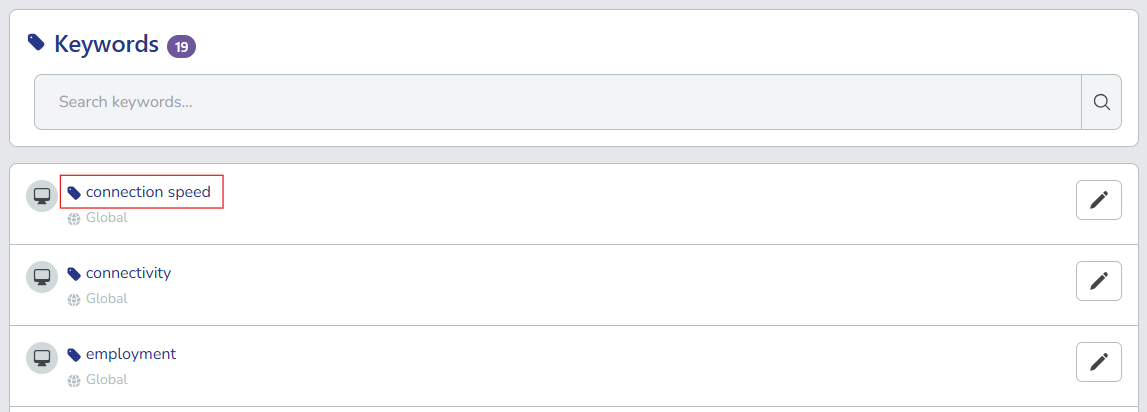
The new keyword now appears in the keywords list. In this example, we added connection speed:
Editors can now select the new keyword when creating or editing dataset records. In this example, we see connection speed.
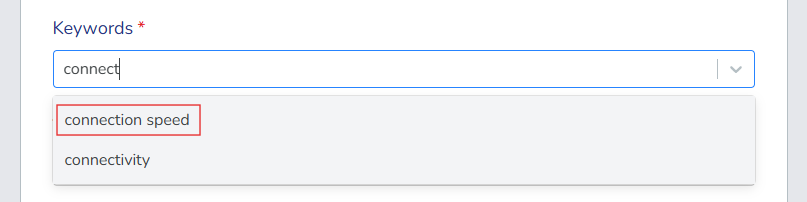
Editors can also add new keywords using the bulk upload feature when adding datasets. New keywords are automatically created if they don't already exist in the system.
Manage existing keywords
After you create keywords, you can edit or delete them as needed.
-
In the keywords list, search and locate the keyword you want to manage. Use the filters to help find specific keywords.
-
Select the edit icon () next to the keyword.
-
Choose your action:
- Edit: Update the keyword details.
- Delete: Permanently remove the keyword from the system. You can only delete keywords that are not associated with any datasets.
After you add keywords, Editors can use them to tag datasets when they add or edit datasets. This improves dataset discoverability across your data catalogue.