Assign users to organisations
In this guide
Overview
Assign users to organisations and define their roles to control access and permissions within your data catalogue. Each user can be assigned to one or more organisations with specific roles that determine what actions they can perform.
How user assignments work:
- You identify and assign users by their email address
- Each assignment links a user to an organisation with a specific role
- Users can have multiple roles within the same organisation or multiple organisation assignments
- User roles determine their permissions within that organisation
Adding a user to an organisation is different from creating a user account. User accounts are created automatically when users sign in for the first time through the authentication system. This guide covers how to assign existing users to organisations and roles.
Add a user to an organisation
To assign users to organisations, you must be a Catalogue Manager or have the permission to manage roles. Check your permissions.
-
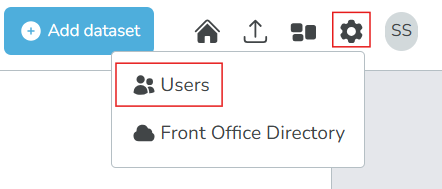
Select the settings icon () beside your profile icon in the main menu.
-
Select Users. The list of existing users and the Assign Role form appears.
-
Select Expand Form to show the user assignment form.
-
Fill out the assignment form:
- Email: Enter the email address of the user you want to assign. The user must already exist in the system, and they must have signed in at least once.
- Organisation: Select the organisation to which you want to assign the user.
- Role: Select the role you want to assign to the user within that organisation.
-
Select Assign Role. The user is now assigned to the organisation with the selected role.
-
To assign multiple roles to the same user, repeat steps 4-5 with different roles as needed.
The roles available for assignment depend on your system configuration. To learn more about roles in your organisation, contact your Inventory Coordinator or System Administrator. Also see: Roles and Permissions.
After you assign users to organisations with appropriate roles, they will have access to manage dataset records and other resources within those organisations according to their role permissions.
To view and manage existing user assignments, see: Manage user assignments.