Add qualified attributions
In this guide
Overview
Add a qualified attribution
Manage existing qualified attributions
Overview
Qualified attributions allow you to associate organisations with specific roles related to a dataset's creation, maintenance, or distribution, beyond the “Publisher” and “Creator” roles explicitly defined in the metadata model. By adding qualified attributions to your datasets, you provide transparency about who is responsible for various aspects of the dataset—improving provenance tracking, accountability and trust for Data Users.
For example: A dataset for Transport Infrastructure published by the Ministry of Transport may have the Department of Data Management as the Custodian. By adding these attributions, Data Users can understand each organisation's role when the dataset record is published.
How qualified attributions work:
- You can add multiple attributions to document all parties involved with a dataset
- The same organisation can have multiple roles (e.g., both Author and Custodian)
- Attribution details appear in published dataset metadata
Add a qualified attribution
Add qualified attributions to link organisations and their specific roles to your dataset record. You must be an Editor or have the permission to edit datasets, check your permissions.
To add attributions to a dataset:
-
Ensure the dataset record is in Draft, or revert it to draft if needed
-
Open the dataset in the Draft tab using one of the following methods:
- Select the options icon ( ⋮ ) on the dataset record, select Edit, and then select Qualified Attributions in the left panel.
- Select View on the dataset, go to the Qualified Attributions tab, and select Manage Qualified Attributions
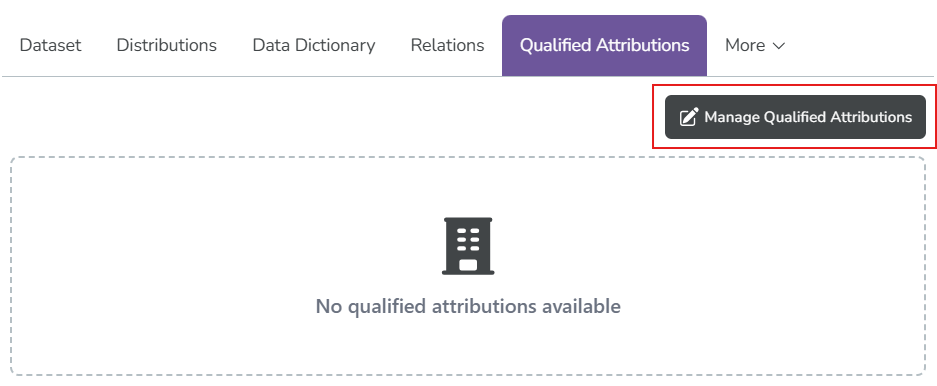
-
Select Expand Form to add a new entry.
-
Fill out the attribution form:
- Organisation: Select the organisation name
- Role: Select the appropriate role that best describes this organisation's relationship to the dataset. For guidance, see: Available attribution roles.
In this example, we select LNDS as the Custodian of the dataset.
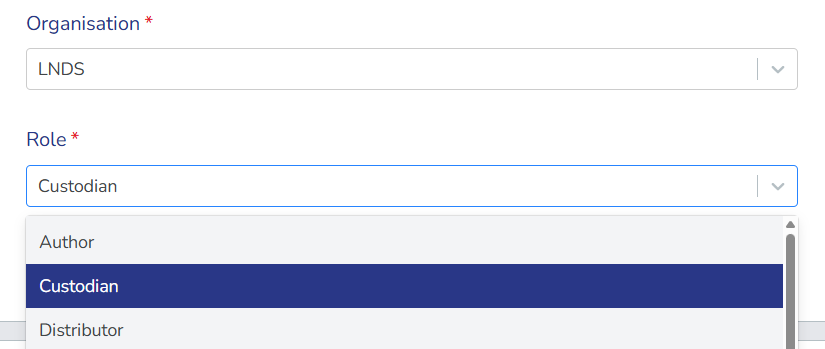
-
Select Add Attribution to save the entry. Repeat for each attribution.
Multiple roles for one organisationThe same organisation can have multiple roles. For example, an organisation might be both the Author and Custodian of a dataset. Add separate attributions for each role.
Available attribution roles
The roles are based on the INSPIRE Responsible Party Role↗ codelist:
- Author: Party who authored the dataset or its documentation
- Custodian: Party responsible for accepting accountability for the data and ensuring appropriate care and maintenance
- Distributor: Party who distributes the dataset to others
- Originator: Party who created the original data or dataset
- Owner: Party who owns the dataset or has ownership rights
- Point of contact: Party who can be contacted for acquiring knowledge about or acquisition of the dataset
- Principal investigator: Key party responsible for gathering information and conducting research
- Processor: Party who has processed the data in a manner such that the dataset has been modified
- Resource provider: Party that supplies the dataset or resource
- User: Party who uses the dataset
Manage existing qualified attributions
After you add attribution entries, you can edit or delete them as needed.
-
Open the dataset editor and select Qualified Attributions in the left panel.
-
Locate the entry you want to manage in the table and select the edit icon (✏️).
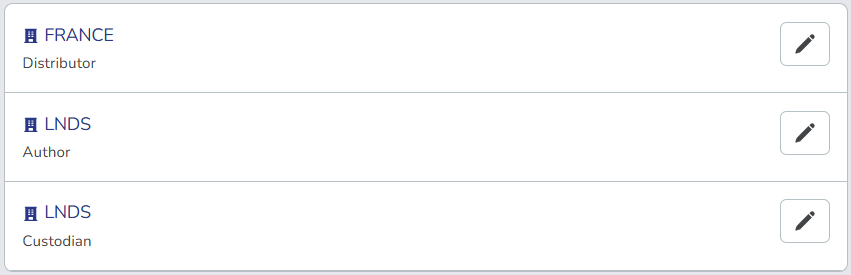
-
Select your action:
- Edit: Update the details and select Update Attribution.
- Delete: Select Delete Attribution to permanently remove the entry.
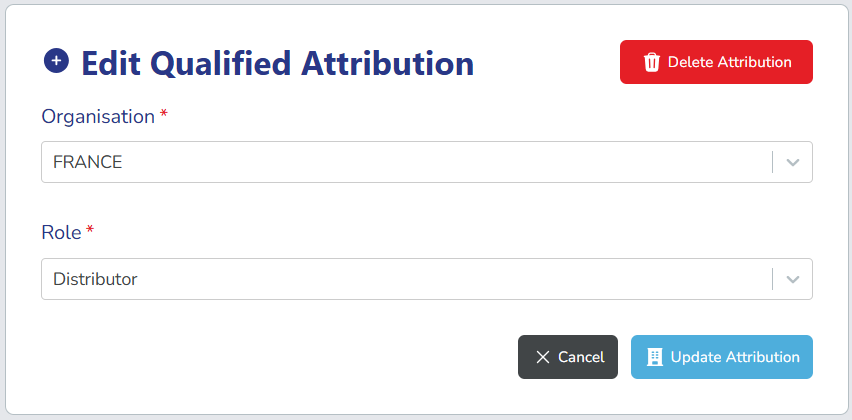
After you add qualified attributions, Data Users can view the organisations and their roles in the published dataset metadata. This improves transparency and accountability.