Deprecate datasets
In this guide
Overview
Deprecate dataset records that have been superseded by corrected or revised versions. Deprecation marks a dataset record as having been replaced, indicating to users that it should not be used for new analyses, while still preserving the historical record for reference. Use this when a dataset contains systematic errors that have been corrected in a newer version, or when underlying calculations have been revised. To understand the dataset record lifecycle, see the dataset record lifecycle.
For example: A systematic calculation error was identified in a dataset of Air Quality Measurement. The error was fixed and all values recalculated according to the correct formula. The old dataset was deprecated and replaced by a newer version, with the descriptive metadata clearly indicating how the calculation changed. The historical metadata record remains available for information purposes only.
How deprecation works:
- Catalogue Managers (or equivalent roles) can deprecate dataset records in Published or Internal Only stage
- Once deprecated, dataset records remain viewable but cannot be restored to previous states
- Deprecated dataset records appear in the Deprecated tab for historical reference
- To make a deprecated dataset record available again, you must recreate it as a new dataset record.
Once a dataset record is deprecated, you can still view its details but you can no longer restore it to its previous states. If you need to make the dataset record available again, you must recreate it as a new dataset record. If you want to edit and republish a dataset record, consider the Unpublish option instead.
Deprecate a dataset
To deprecate a dataset, you must be a Catalogue Manager or have the permission to deprecate datasets. Check your permissions.
-
Go to the Published or Internal Only tab in the datasets panel.
-
Select View on the dataset record you want to deprecate.
-
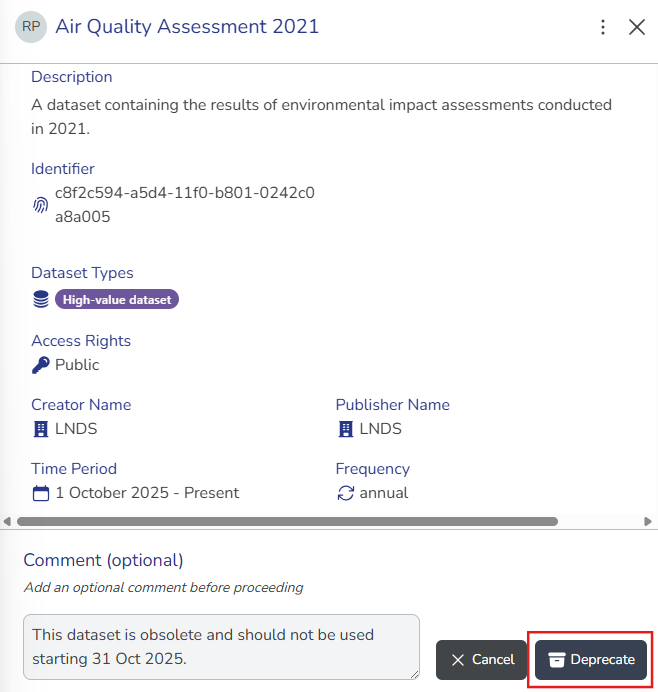
Select Deprecate Dataset. The comment box appears.
-
(Optional) Enter a comment explaining why you are deprecating the dataset record to provide context to other collaborators.
-
Select Deprecate Dataset to confirm. The dataset recordappears in the Deprecated tab.
Deprecate vs unpublish- Deprecate: Use when a dataset record is outdated or no longer relevant, but you want to keep it accessible for historical reference. No further edits or publications can be made.
- Unpublish: Use when a dataset record contains errors or sensitive information and should be removed from public access. The dataset record moves back to the Approved stage for further review and correction.