Duplicate dataset records
In this guide
Overview
Duplicate dataset records to quickly create an independent copy of an existing dataset with all its metadata. Duplication is useful for creating templates or when you need to make similar datasets with minor variations. By duplicating, you save time by not having to re-enter all metadata from the start.
How duplication works:
- You can duplicate dataset records at any stage in their lifecycle, from any status tab (Draft, Completed, Approved, Published, Internal Only, or Deprecated).
- No relationship exists between the original and the duplicate dataset, unless you manually link them
- A new unique identifier is automatically generated for the duplicate
- All metadata fields except for authentic source labels are copied to the duplicate. Read more: What gets duplicated?
- Open Data dataset records (imported from data.public.lu) cannot be versioned as they are read-only.
- Use duplication to create independent datasets with no connection to the original—ideal for templates or similar datasets.
- Use versioning to create tracked updates of published datasets where changes are linked to the original.
Duplicate a dataset
To duplicate a dataset, you must be an Editor or have the permission to edit datasets. Check your permissions.
-
Browse or search for the dataset record you want to duplicate anywhere in the datasets panel.
-
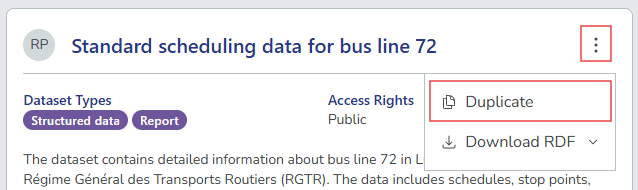
Select the options icon ( ⋮ ) on the dataset, and then select Duplicate. The system creates a copy of the dataset record and automatically opens the dataset editor with the new dataset.
-
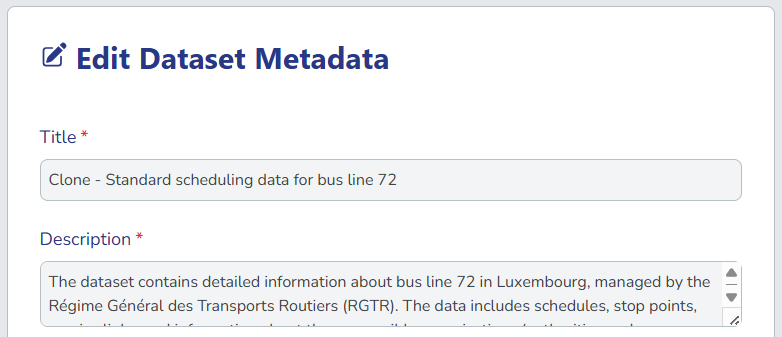
Review and modify the duplicated dataset details:
- Title: Prefixed with "Clone -" to distinguish it from the original
- All metadata fields: distributions and data dictionary entries
-
Update the fields as needed, then select Preview & Save to save the dataset as a draft. From here, you can continue editing, submit the dataset for approval.
What gets duplicated?
The following properties are included when duplicating a dataset:
- All metadata fields: Title with "Clone -" prefix, description, temporal coverage, etc.
- Distributions: Access URLs, formats, and all distribution metadata
- Data dictionary entries: Field names, descriptions, and data types
- Dataset relations: Links to other datasets or external resources
- Qualified attributions: Role assignments for organisations
- All other DCAT-AP-LU metadata properties
The following properties are not included when duplicating a dataset:
- Version relationships: The duplicate is not linked to the original as a version
- Authentic source labels: Must be manually reassigned in data dictionaries
- Activity logs: The duplicate starts with a fresh activity log
- Comments: Comments from the original dataset are not copied
Duplicated datasets are completely independent from the original. If you want to create a tracked version of an existing published dataset, consider creating a new version of the dataset instead.